Claude Comes to Word: Anthropic Completes Its Microsoft Office Integration
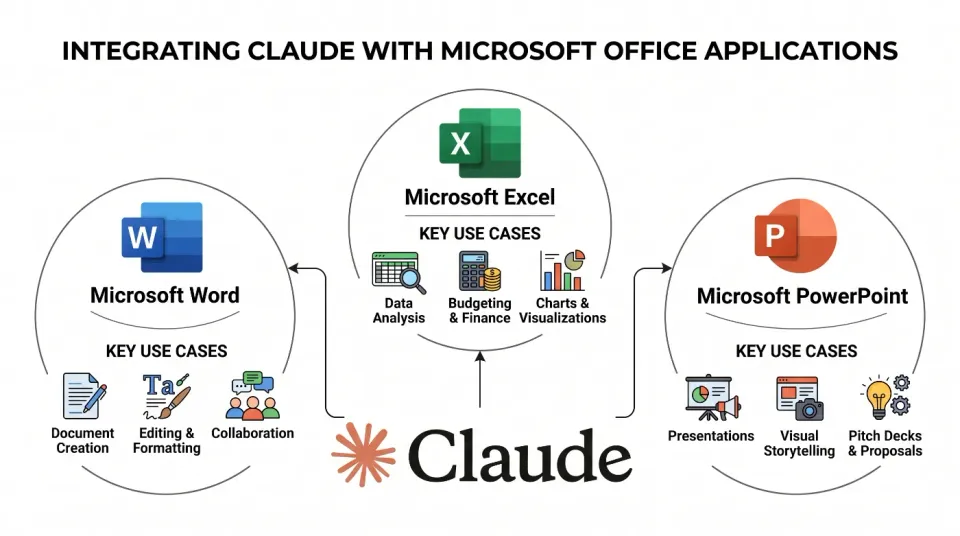
Anthropic has quietly shipped one of the more consequential AI productivity moves of the year. With the public beta launch of a Claude add-in for Microsoft Word, the company has completed direct, native integration across the entire Microsoft Office suite — Word, Excel, and PowerPoint — for Team and Enterprise subscribers. That means, for the first time, a non-Microsoft AI model sits inside every major Office application by design, not by workaround.
This is not a browser extension or a copy-paste workflow. It is a purpose-built add-in that lives inside Word itself, putting Claude's writing, editing, and reasoning capabilities directly in the document environment where knowledge workers spend a significant share of their day. Combined with the existing Excel and PowerPoint integrations, Anthropic has built a full-suite AI layer that competes head-on with Microsoft's own Copilot — inside Microsoft's own software.
[IMAGE: A laptop showing Microsoft Word open with the Claude add-in panel visible on the right side, displaying a conversation interface with a document draft visible in the main editing area. Clean, modern office environment background.]
TL;DR
- Anthropic's Claude add-in for Microsoft Word is now in public beta for Team and Enterprise subscribers, completing Claude's integration across Word, Excel, and PowerPoint.
- The Word add-in supports drafting, rewriting, summarising, and tone adjustments directly inside the document — no tab-switching required.
- This makes Claude the first third-party AI model with native add-in coverage across the full core Office suite, directly challenging Microsoft Copilot on its home turf.
- Enterprise customers get additional data privacy controls, keeping document content out of Anthropic's training pipeline under the Enterprise agreement.
- The integration marks a broader strategic shift: AI assistants are moving from standalone chat windows into the tools people already use every day.
What Does the Claude Word Add-In Actually Do?
The Claude Word add-in is a task pane that opens inside Microsoft Word, giving users a persistent chat interface alongside their document. According to Anthropic's release notes, the add-in can read the document's current content and respond to instructions in context — meaning you can highlight a paragraph, ask Claude to tighten it, and see the revised version appear without leaving Word. The core use cases break down into four categories: drafting, editing, summarising, and tone adjustment.
Drafting is the obvious entry point. Users can describe a section they need — a legal disclaimer, an executive summary, a performance review template — and have Claude generate a first draft directly into the document. More practically, the editing workflow is where the add-in earns its keep for daily users. You can ask Claude to fix passive voice throughout a selected section, restructure bullet points into flowing prose, or flag places where the argument loses logical coherence. These are tasks that previously required copying text into a separate Claude.ai window, manually reviewing the output, and pasting back — a friction-heavy loop that many users simply skipped.
The summarisation feature is particularly relevant for enterprise document workflows. Long contracts, research reports, and internal memos can be condensed into executive summaries on demand. Tone adjustment — shifting a draft from formal to conversational, or from internal-facing to client-ready — completes the editing toolkit.
How Does the Word Integration Compare to Excel and PowerPoint?
Anthropic rolled out its Office add-ins in stages. The PowerPoint add-in arrived first, allowing users to generate slide content, rewrite speaker notes, and restructure presentation flow. The Excel integration followed, focusing on formula explanation, data summarisation, and generating structured tables from natural language descriptions — a workflow that proved popular with analysts who found Claude's ability to explain complex Excel formulas in plain English genuinely useful. The Word add-in is the final piece, and arguably the highest-stakes one, given that Word remains the dominant document creation tool in most enterprise environments.
Across all three applications, the architecture is consistent: a task pane, document context access, and a conversational interface. But the depth of integration varies by application. In Excel, Claude can reference cell ranges and named tables. In PowerPoint, it can work with slide-level structure. In Word, it gets the richest context — full document text, headings, and selection state — which makes the Word integration the most capable of the three for complex, iterative editing tasks.
What ties the suite together is the shared authentication layer. Team and Enterprise subscribers sign in once through their Microsoft 365 account, and the same Claude subscription activates across all three add-ins. There is no separate billing, no separate login, and no need to manage multiple integrations independently.
Why Does This Matter for Enterprise AI Strategy?
The significance of completing this Office suite integration extends well beyond convenience. Microsoft 365 has approximately 400 million paid seats as of early 2025, according to Microsoft's own earnings reports, making it the largest enterprise software platform on the planet by user count. Any AI model that achieves native integration across that platform's core applications has effectively gained access to the largest single deployment surface in knowledge work.
For Anthropic, this matters commercially and strategically. Commercially, embedding Claude inside tools that enterprise workers already open every morning reduces the adoption friction that kills standalone AI product adoption. Strategically, it positions Claude as a viable alternative — or complement — to Microsoft Copilot, which also lives inside Office applications but costs an additional $30 per user per month on top of a Microsoft 365 subscription. Claude's Team plan, by contrast, includes Office add-in access without that incremental per-user cost layer, which makes the pricing comparison favourable for budget-conscious IT buyers.
There is also a trust dimension. Anthropic has built its enterprise positioning around Claude's Constitutional AI training and its commitment to safer outputs. For organisations handling sensitive documents — legal, financial, healthcare — the combination of a privacy-protective enterprise agreement and native Office integration is a meaningful selling point that Copilot's deeper Microsoft data integration cannot as easily claim.
How Do You Install and Set Up the Claude Word Add-In?
Installation follows the standard Microsoft AppSource add-in process. Team and Enterprise subscribers can find the Claude add-in by navigating to the Insert tab in Word, selecting Add-ins, and searching for "Claude" in the AppSource marketplace. Alternatively, administrators can deploy the add-in centrally across an organisation through the Microsoft 365 admin centre, which pushes it to all users without requiring individual installation. This admin-level deployment is the recommended path for enterprise rollouts, as it ensures consistent versioning and allows IT to configure data handling policies before users start interacting with documents through Claude.
Once installed, the add-in appears as a Claude icon in the Word ribbon. Clicking it opens the task pane. On first launch, users authenticate with their Anthropic account — the same credentials used for Claude.ai or the API. After authentication, the add-in is persistent across Word sessions.
The current beta has a few known limitations worth noting. The add-in works in the Word desktop application on Windows and Mac, and in Word for the web. Mobile Word applications are not yet supported in the beta. Very long documents — above approximately 100,000 words — may hit context window constraints, though Anthropic has not published a hard limit. The company has indicated that these constraints will be addressed before the integration exits beta.
What Are the Privacy and Data Controls for Enterprise Users?
Data handling is the question IT and legal teams ask before approving any AI tool that touches documents, and it is where Anthropic has been deliberate in its enterprise positioning. Under the standard Anthropic Enterprise agreement, document content processed through the Office add-ins is not used to train Claude's models. This is the same commitment Anthropic makes for the Claude API and the Claude.ai Enterprise tier. For Team plan subscribers — the lower-tier business offering — the data handling policy is similar but organisations should verify their specific agreement terms, as the Team plan has different provisions than the full Enterprise contract.
The add-in communicates with Anthropic's API over encrypted connections, and no document content is stored on Anthropic's servers after the API response is returned. Administrators can review these data flow details in the Microsoft 365 admin centre under the add-in's privacy policy disclosure, which Microsoft requires all AppSource add-ins to publish. For organisations operating under strict data residency requirements — GDPR in Europe, for instance — Anthropic's data processing addendum is available as part of the Enterprise agreement and covers the Office add-in workflows explicitly.
Does This Make Claude a Direct Copilot Competitor?
Yes, and Anthropic is not being subtle about it. The completion of the Office suite integration removes the last functional gap that allowed enterprise buyers to say "Copilot does Office, Claude does chat." Now both do Office. The differentiation has shifted to model quality, pricing structure, and trust posture.
On model quality, Claude 3.7 Sonnet — the model powering the add-ins at launch — performs strongly on writing, editing, and reasoning tasks. Independent benchmarks published by platforms including LMSYS Chatbot Arena have consistently placed Claude models in the top tier for instruction-following and long-form text quality, which maps directly to Word use cases. Microsoft Copilot, powered by GPT-4o, is a capable competitor on these same tasks, and the practical quality difference for most document workflows is marginal.
Where the gap is more tangible is pricing. Microsoft Copilot for Microsoft 365 is priced at $30 per user per month as an add-on, on top of existing Microsoft 365 subscription costs. Claude's Team plan is $25 per user per month and now includes the full Office suite add-in access. For a 500-person organisation, that $5-per-user difference represents $30,000 per year — enough to move procurement conversations. The Enterprise tier pricing is negotiated and varies, but the structural argument is the same.
What Comes Next for Claude's Productivity Integrations?
Anthropic has not published a formal roadmap for what follows the Office suite completion, but the trajectory is readable. The company has active integrations with Notion, Slack, and Google Drive, and has expanded its API partnerships aggressively through 2024 and into 2025. The logical next steps are deeper context integration — allowing Claude to reference files across a user's OneDrive within a Word session, for example — and workflow automation hooks that connect Office document actions to broader enterprise systems.
There is also the question of Outlook. Email is the fourth major pillar of the Microsoft 365 suite, and the absence of a Claude Outlook add-in is conspicuous now that Word is covered. Anthropic has not confirmed an Outlook integration is in development, but the pattern of completing the document suite first — where Claude's writing strengths are most directly applicable — and then expanding to communication applications is a logical sequencing.
For users, the practical advice is simple: if you are on a Claude Team or Enterprise plan, install the Word add-in during the beta and stress-test it with your real document workflows. Beta feedback shapes feature prioritisation, and early adopters who report specific use case gaps are more likely to see those gaps addressed before general availability. The add-in is free to use under your existing plan, the installation takes under two minutes, and the upside is having Claude inside the tool where you already do most of your writing.
FAQ
Who can use the Claude Word add-in, and does it cost extra?
The Claude Word add-in is available to Claude Team and Claude Enterprise subscribers. There is no additional cost beyond your existing plan — the add-in is included in both tiers. Claude Team is priced at $25 per user per month (billed annually), while Enterprise pricing is negotiated based on organisation size and requirements. Free and Pro plan users on Claude.ai do not currently have access to the Office add-ins. The add-in is currently in public beta, meaning it is available to all eligible subscribers but may still receive stability and feature updates before a formal general availability release. Individual users can install it themselves from Microsoft AppSource, or IT administrators can deploy it centrally across an organisation through the Microsoft 365 admin centre.
Does Claude read my entire Word document, or only the text I select?
The Claude Word add-in can access the full text of the open document when you interact with it, which is what allows it to perform tasks like summarising a long report or suggesting structural edits across an entire draft. If you highlight a specific section before sending a prompt, Claude will treat that selection as the primary context, though it can still reference the surrounding document. You can also paste specific content directly into the chat interface if you prefer to limit what Claude sees. Anthropic's privacy documentation states that document content is processed only to generate your requested response and is not retained after the session. Enterprise users can verify the specific data handling terms in their agreement.
How is the Claude Word add-in different from Microsoft Copilot in Word?
Both tools live inside Word and perform similar surface-level tasks — drafting, editing, summarising, rewriting. The key differences are model, price, and data trust posture. Claude uses Anthropic's Claude 3.7 Sonnet model; Copilot uses Microsoft's deployment of OpenAI's GPT-4o. On price, Copilot for Microsoft 365 costs an additional $30 per user per month on top of existing Microsoft 365 licensing, whereas Claude Team at $25 per user per month includes Office add-in access as part of the base plan. On trust, Anthropic's Enterprise agreement explicitly excludes document content from model training, which is a meaningful distinction for organisations with sensitive or proprietary document workflows. In practice, both are strong tools; the choice often comes down to procurement, existing contracts, and specific model quality preferences.
Can IT administrators control or restrict the Claude Word add-in across an organisation?
Yes. Because the Claude add-in is distributed through Microsoft AppSource, it falls under the standard Microsoft 365 add-in governance framework. IT administrators can allow or block the add-in at the tenant level, deploy it to specific user groups or departments, and set it as a default installation for all users through the Microsoft 365 admin centre under Integrated Apps. Anthropic also provides an enterprise admin console where organisation-level settings — including data handling configurations and usage monitoring — can be managed independently of the Microsoft 365 admin centre. For organisations with strict information security policies, the recommended approach is a centralised deployment with admin review of the add-in's permission scope before allowing end-user access.
Is the Claude Word add-in available on Mac, Windows, and web versions of Word?
In the current public beta, the Claude Word add-in is supported on Microsoft Word for Windows (desktop), Microsoft Word for Mac (desktop), and Microsoft Word for the Web — the browser-based version accessible through Microsoft 365 online. Word for iOS and Android are not currently supported in the beta. Anthropic has indicated that mobile support is on the roadmap but has not confirmed a timeline. Users on older perpetual-licence versions of Microsoft Office (Office 2019 or earlier, for instance) that are not connected to a Microsoft 365 subscription will not be able to install add-ins from AppSource and therefore cannot use the Claude integration. A current Microsoft 365 subscription is a prerequisite.
The Bottom Line
Anthropic completing its Office suite integration is a concrete, material step — not a press release milestone. It removes the workflow friction that prevented Claude from being a first-choice tool for enterprise document work, and it puts a capable, well-priced alternative directly alongside Copilot in the applications where knowledge workers spend most of their time.
The Word add-in is in beta, which means there will be rough edges. But the core capability — Claude reading your document, responding to instructions, and helping you produce better writing without leaving Word — works now. If you are already paying for Claude Team or Enterprise, installing it takes two minutes and costs nothing extra. The question is not whether to try it. The question is whether it is good enough to change which tools you reach for by default.
Based on the trajectory of the Excel and PowerPoint integrations, which improved substantially between beta and GA, the answer by the time Word exits beta is likely yes.