What Are Claude Code Skills? How Teams Actually Use Them
What Are Claude Code Skills, Exactly?
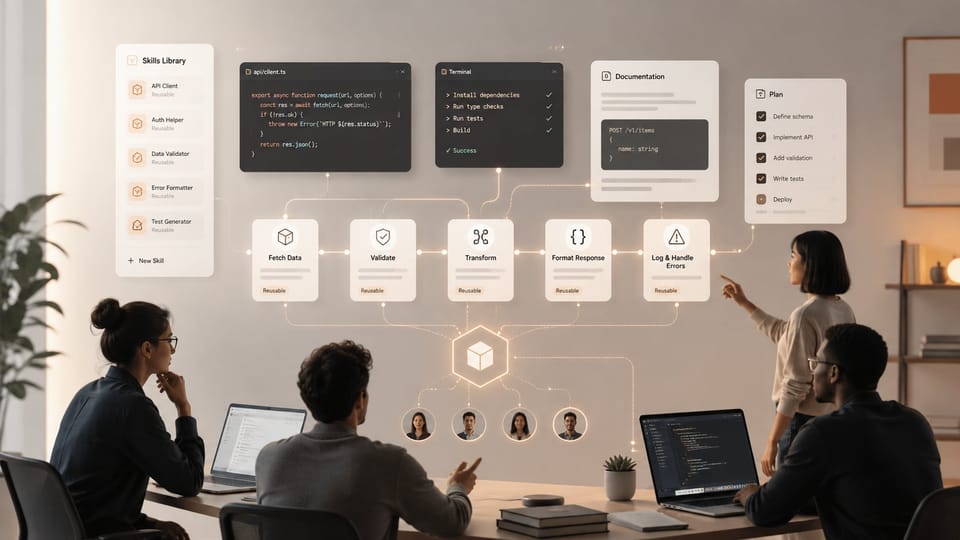
A Claude Code Skill is a folder. That's the whole trick. Inside it sits a SKILL.md file with instructions, plus any scripts, templates, or reference docs the task needs, according to Anthropic's Agent Skills announcement. Claude reads the folder's name and description first, then loads the full instructions only when the task actually matches.
That last part is the whole point. Most AI tools force you to choose between two bad options: cram everything into one giant system prompt, or write a fresh prompt every single time. Skills solve this with what Anthropic calls "progressive disclosure" — Claude only pulls in what it needs, when it needs it.
Think of a Skill as a specialist Claude can call in. You don't re-explain your company's PDF-formatting rules every session. You write it once, drop it in a folder, and Claude picks it up automatically whenever a PDF task shows up.
TL;DR
- A Skill is just a folder with a SKILL.md file plus optional scripts and resources — no special framework required, per Anthropic's own documentation.
- Claude loads Skills in stages: a short description first, full instructions only when triggered, and bundled files only when actually needed.
- 76% of developers are already using or planning to use AI tools in their workflow, according to the 2024 Stack Overflow Developer Survey — Skills are the next step in making that usage repeatable.
- Teams use Skills for three main jobs: coding conventions, document generation, and internal tool wrappers.
- The main risk isn't the tech — it's skill sprawl. Untracked, undocumented Skills rot the same way stale scripts do.
Claude Code isn't the only place Skills work — they run across Claude apps, the API, and the Agent SDK. But Code is where most teams feel the difference first, because coding work is repetitive in a way that rewards reusable instructions.
Why Skills Instead of Just a Longer Prompt?
A long prompt is static. It sits in context whether you need it or not, eating tokens and diluting Claude's focus. A Skill is conditional. Claude scans a short description — often under 100 words — and only loads the rest if the task matches.
That difference sounds small. It isn't. Teams running Claude Code on real codebases report that unfocused context is one of the biggest drivers of sloppy output. Skills keep the working context lean by design, not by discipline.

How Do Skills Differ From Prompts, Tools, and MCP Servers?
Skills, prompts, tools, and MCP servers solve different problems, and mixing them up is the most common source of confusion on engineering teams. A prompt is a one-time instruction. A tool gives Claude a new capability, like calling an API. An MCP server connects Claude to external systems. A Skill packages knowledge and process — the how, not just the what.
Here's the practical breakdown:
- Prompts are ephemeral. Write them, use them, they're gone unless you save them somewhere.
- Tools (via MCP or function calling) give Claude new actions — read this database, hit this API.
- MCP servers are the connective layer between Claude and outside systems.
- Skills are portable expertise. They can call tools and reference MCP connections, but they exist independently as files you can version, share, and audit.
This matters because teams often try to solve a "Claude keeps forgetting our style guide" problem by writing a longer and longer prompt. That's the wrong layer. The style guide belongs in a Skill, loaded only when Claude is writing code or docs — not sitting in every single conversation burning tokens.
Do Skills Replace MCP Servers?
No, and this trips people up constantly. MCP handles connections — Slack, GitHub, a database, a ticketing system. A Skill handles judgment — what to do once connected, in what order, following which internal conventions. Anthropic's own engineering guidance on Claude Code treats these as complementary layers, not competing ones. A well-built Skill often calls an MCP tool halfway through its instructions.
Building Your First Skill: A Practical Walkthrough
The fastest way to understand Skills is to build a small one, and most teams get a working version running in under 30 minutes because the format is just markdown plus metadata. Here's the minimal path.
Step 1: Write the Description First
The description field is the only part Claude reads by default. Make it specific: "Use when generating quarterly financial reports in our company's PDF template" beats "Handles reports." Vague descriptions mean Claude never triggers the Skill, or triggers it for the wrong task.
Step 2: Write the Instructions Like You're Onboarding a New Hire
The SKILL.md body should read like a checklist a smart new employee could follow without asking questions. Include the non-obvious stuff — naming conventions, edge cases, "don't do X because it broke Y last time." This is where teams' actual institutional knowledge finally gets written down.
Step 3: Bundle Only What's Needed
Scripts, boilerplate templates, and reference tables go in the folder alongside SKILL.md. Claude loads these on demand, not upfront, according to Anthropic's progressive disclosure model. This keeps a Skill's footprint small even if the folder itself holds thousands of lines of reference material.
Quick check: if your Skill's SKILL.md is pushing past 5,000 words, split it. Move detailed reference material into a separate file the Skill links to, so it only loads when actually needed.
Step 4: Test It Against a Real Task, Not a Toy One
Skip the "hello world" test. Run the Skill against an actual ticket or report from last week. If Claude produces something a teammate would accept without edits, the Skill is ready. If not, the gap tells you exactly what's missing from the instructions.
How Are Engineering Teams Actually Using Skills?
Teams are converging on three main use cases: enforcing coding conventions, generating structured documents, and wrapping internal tools with judgment logic. This mirrors a broader pattern where 78% of organizations now use AI in at least one business function, according to McKinsey's 2025 State of AI report — the tooling maturity is finally catching up to the adoption curve.
Coding conventions. A Skill that encodes "how we write tests," "how we name branches," or "how we structure API responses" turns tribal knowledge into something Claude enforces automatically, without a senior engineer re-explaining it in every code review.
Document generation. Finance and ops teams build Skills for recurring outputs — board decks, compliance reports, client onboarding packets — where the format is fixed but the content changes weekly. This is one of the clearest wins because the ROI shows up immediately in hours saved.
Internal tool wrappers. Skills that combine an MCP connection (say, to a ticketing system) with judgment ("triage priority based on these criteria, escalate if X") let Claude act more like a junior teammate than a chatbot.

What's the Real Productivity Gain?
Task-level speedups are the clearest signal so far. Developers using AI pair-programming tools completed coding tasks up to 55% faster, according to GitHub's 2022 productivity research, and Skills push that further by removing the re-explanation tax — the minutes lost every session reminding an AI assistant how your team actually works.
The gain compounds. Once a Skill exists, every team member benefits from it immediately, not just the person who wrote it. That's different from a personal prompt library, which usually dies in someone's notes app.
What Are the Risks and Limits of Skills?
The main risk with Skills isn't technical failure — it's organizational sprawl, the same way stale scripts and dead cron jobs pile up in any codebase left unmanaged. A Skill nobody owns becomes a Skill nobody trusts, and Claude following outdated instructions confidently is worse than Claude having no instructions at all.
Version control helps but doesn't solve it alone. Teams need a lightweight review process — someone checks new Skills before they go live, the same way you'd review a PR. Skip this and you'll eventually get a Skill that tells Claude to follow a process your team abandoned six months ago.
There's also a scope trap. Skills work best narrow and specific. A Skill that tries to handle "all customer communication" will underperform three focused Skills for onboarding emails, refund responses, and escalation triage. Specificity is what makes the trigger-matching reliable in the first place.
Should Every Team Build Skills?
Not necessarily, and forcing it creates more overhead than value for teams without repetitive workflows. Skills earn their keep when a task recurs weekly and follows a semi-fixed process — think report generation, code review checklists, or support triage. If your work is mostly novel, one-off problem solving, a well-written prompt still beats the overhead of maintaining a Skill folder nobody reuses.
Where Is This Headed?
Skills point toward AI assistants that behave less like search boxes and more like colleagues with institutional memory, which is the direction most agentic tooling has been moving since MCP standardized how models connect to external systems. Expect Skill marketplaces, shared team libraries, and eventually automated Skill generation from observed workflows — Claude noticing a repeated pattern and suggesting it become a Skill.
For now, the practical move is small: pick one recurring, annoying task your team does weekly, write a Skill for it this week, and see what breaks. That's a better teacher than any documentation.
Frequently Asked Questions
Do Claude Code Skills require any special coding knowledge to build?
No. A Skill is a markdown file (SKILL.md) plus optional supporting files — no programming framework or SDK required to get started. Anyone comfortable writing clear instructions in plain English can build one. That said, Skills can bundle scripts (Python, shell, JavaScript) for tasks that need actual code execution, which is where technical skills help. According to Anthropic's documentation, the format was intentionally kept simple so non-engineers on a team — like ops or finance staff — can write and maintain their own Skills without needing a developer to translate their process into code.
Can Skills work across different Claude products, or are they Claude Code-specific?
Skills work across Claude.ai, the Claude API, Claude Code, and the Agent SDK — they're not locked to one product. This portability is one of the bigger practical advantages: a Skill your team builds for internal reporting in Claude Code can be reused in a Claude.ai project without rewriting it. The underlying architecture (a folder with SKILL.md plus resources) stays the same regardless of where Claude runs it. Teams that build Skills once and deploy them across multiple surfaces get the most value from the reuse.
How is a Skill different from a custom GPT or a saved prompt template?
A saved prompt template is static text you paste in manually every time. A Skill is discovered and loaded automatically by Claude based on the task at hand, without you needing to remember it exists or copy it in. Skills also support bundled files — scripts, templates, reference tables — that load conditionally, which most prompt-template systems don't support. The progressive disclosure design means Skills scale to far more complex, detailed instructions than you'd ever want sitting in a single static prompt.
What happens if two Skills could both apply to the same task?
Claude uses the Skill descriptions to judge which one fits best, which is why writing precise, non-overlapping descriptions matters so much during setup. Vague or overlapping descriptions — two Skills both saying "handles reports" — increase the odds Claude picks the wrong one or gets confused. The fix is specificity: describe the exact trigger condition, not just the general topic. Teams that run into this issue usually solve it by auditing their Skill library and tightening descriptions rather than by adding more instructions to the Skills themselves.
Is there a limit to how many Skills a team can maintain?
There's no hard technical cap, but practical limits show up well before any system limit does — mainly around discoverability and maintenance. Once a team has dozens of Skills, someone needs to own an index of what exists, what it does, and when it was last reviewed, or duplicates and conflicts creep in. Most teams that scale past 15-20 Skills start treating the Skill library like a small internal package registry, with clear ownership and periodic review, rather than letting folders accumulate unmanaged in a shared drive.